
Running a local LLM without a GPU
Yes—quantized small models can run locally on system CPU and RAM without a discrete GPU. Responses will be slower than dedicated GPU inference, so start with a small model to confirm everything works before trying larger ones.
Updated July 21, 2026
Fastest working route: Ollama on Linux
Ollama picks hardware based on what it finds at runtime. When no compatible GPU compute runtime is present, it runs the model on system CPU threads and system memory.
This downloads the binary and sets up a background service.
The first run downloads the model once, then opens interactive chat. TinyLlama is only a low-memory smoke test to confirm execution—not a quality recommendation.
Check that the model is listed under CPU execution. Note: ollama serve is only needed if the CLI cannot connect to the service—not during normal operation.
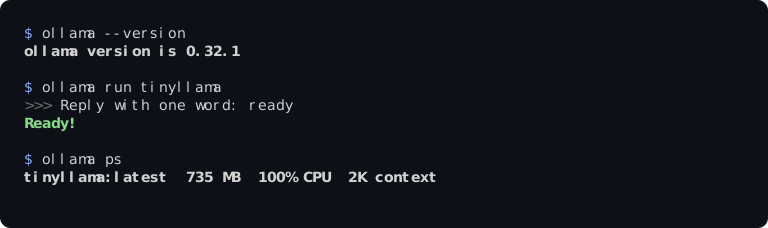
/dev/dri devices, and no NVIDIA runtime. Running Ollama 0.32.1 with TinyLlama (637 MB download / 735 MB shown for the loaded model), ollama ps confirms 100% CPU allocation. This clean test confirms CPU placement; it is not a universal memory measurement or speed benchmark. Results will not generalize to higher-spec CPUs or larger models. Choose a model that fits your RAM
Memory is shared by model weights, conversation context, the runner, and the OS. If RAM fills up, the machine may start swapping to disk and feel very slow. These tiers are conservative starting points only—actual fit depends on quantization, runner, OS memory use, and context length. Check the model file size and your runner’s docs, and test a small quantized model first before assuming a larger one will fit. If you hit pressure, shorten context or pick a smaller model before upgrading hardware.
| RAM | Tier | Good first test | Realistic Expectation |
|---|---|---|---|
| 4 GB | Smoke test / Minimal | Tiny ~1B quantized models (e.g. TinyLlama) — test a small model first | Confirms setup works; little room left for OS or long context |
| 8 GB | Entry level | May fit small quantized models (roughly 1B–3B class); verify file size first | Basic chat and short prompts; keep context modest |
| 16 GB | Practical workstation | May fit mid-size quantized models (often in the 7B–8B class at 4-bit) | Practical starting point for local CPU chat and light coding help |
| 32 GB | Expanded capacity | May fit larger quantized models or longer context; check runner docs | More headroom for bigger weights and longer conversations |
| 64 GB+ | High capacity | May fit very large quantized models or several concurrent CPU jobs | Capacity-focused when speed is secondary; still test before committing |
What will feel slow on CPU?
On CPU, two different waits often get mixed up with “how fast the model talks”:
- Time-to-first-token (prompt prefill): Before the first word appears, the CPU has to work through the whole prompt. Long prompts, system instructions, or pasted code make this wait longer.
- Token generation (streaming speed): After that, how quickly new words appear is often limited more by memory bandwidth than by raw core count alone.
Practical tips: keep context short (for example 2k–4k when you can), start with the runner’s default thread setting then compare a physical-core-count setting on your real prompts, and prefer 4-bit quantized models (such as Q4_K_M when available) to lower memory use per token.
If you prefer a desktop app: LM Studio
LM Studio is a desktop app for finding, downloading, and trying local models on Windows, macOS, and Linux. Without a discrete GPU, set GPU offload to zero (or use the CPU load path below).
For CLI details, see the official LM Studio CLI documentation.
If you need more control: llama.cpp
llama.cpp is the core engine behind many local quantized runners. You point it at a model file and control how much (if any) work goes to a GPU.
--n-gpu-layers 0 (or -ngl 0) keeps model layers on CPU/system RAM. Optional flags include -t <threads> for thread count and -c <tokens> for max context—start from defaults, then compare settings on your own prompts.
Troubleshooting CPU execution
Cannot connect to Ollama daemon
If commands exit with could not connect to ollama app, start the service with ollama serve in another terminal, or check systemctl status ollama.
Out of Memory (OOM) & disk swapping
If the machine crawls or disk activity spikes while you prompt, RAM is likely full and swapping. Close other apps, lower context (for example num_ctx 2048), or use a smaller model / heavier quantization.
Excessive prefill delays on prompt submission
If you wait a long time before any tokens stream, the prompt is expensive to process on CPU. Shorten the system prompt, trim chat history, or reduce max context.
Apple Silicon distinction (Macs)
Apple Silicon Macs (M1 and later) have an integrated GPU and unified memory shared with the CPU, so they are not a strictly CPU-only setup. Supported runners can use Metal acceleration when available—check your runner’s macOS docs for current behavior rather than assuming pure CPU execution.
CPU vs GPU vs Hosted API
Pick a path based on budget, privacy needs, and how fast responses need to feel:
- CPU-only: Good fit for hardware you already own, private local work, or batch jobs where waiting is acceptable.
- Discrete GPU: Better when you want snappier interactive chat, faster coding help, vision workloads, or multi-step agent loops. See running local models on 8 GB VRAM.
- Hosted APIs: Useful for occasional access to large frontier models without buying hardware. Explore open-source web UIs on the self-hosted ChatGPT stack registry.
Inference engines in the registry

Baseline engine for CPU inference; supports explicit CPU-only runs with --n-gpu-layers 0 and common quantized model files.

Runs on CPU when no compatible GPU runtime is available, with a simple install and built-in model management.

llama.cpp bundled into a single cross-platform executable that runs on Linux, macOS, and Windows with minimal setup.
Frequently asked questions
Can I run an LLM without a discrete GPU?
Yes. Small quantized models run on system CPU and RAM with tools like Ollama, LM Studio, or llama.cpp. Expect slower responses than a GPU setup—start with a small model to see how your machine feels before trying anything larger.
Why does the first response take longer on CPU?
Before any output appears, the runner processes the full prompt (time-to-first-token / prefill). Long prompts, large system instructions, or pasted files make that wait more noticeable on CPU.
Does adding more CPU threads make inference faster?
Not always. Start with the runner’s default thread setting, then try a physical-core-count setting and compare both on your real prompts. The better choice depends on your CPU, OS, and workload—measure rather than assuming.
Is an Apple Silicon Mac considered a CPU-only machine?
Usually not in the strict sense. Apple Silicon has an integrated GPU and unified memory shared with the CPU. Supported runners can use Metal acceleration when available, so macOS setups are often hybrid rather than pure CPU-only.
Sources
Every tool listed is indexed in the Awesome Open Source AI registry, updated twice daily from the curated upstream source. For more serving engines and CPU backends, browse the Inference Engines & Serving category.
